Every monsoon, I end up scrolling through fashion editorials shot in places like Paris or Prague — wet cobblestones, blossom trees, a model with rain in her hair, looking like she just stepped out of a magazine spread. And every time, I think the same thing: I’ll probably never get to shoot something like that. Flights, permits, a whole crew standing around hoping the rain shows up on schedule — it’s not realistic for most of us, AI tools or not.
So this time, instead of just scrolling past it, I tried building one myself. One reference photo, an afternoon of trial and error, and five images came out the other side that genuinely surprised me — not because they looked impressively “AI,” but because they didn’t look AI at all.
Picking a Mood and Sticking to It
The goal wasn’t to make something flashy. I wanted it to feel like an actual editorial — the kind you’d find in the travel or fashion pages of a glossy magazine. That meant choosing a mood early and not drifting from it: rain instead of sunshine, soft pink blossoms instead of loud colors, old European stone instead of anything modern or busy.
Rain alone does most of the emotional work in a photo like this. It softens the light, adds reflections on the ground, and weighs down hair and fabric in a way that just reads as real. Add blossom trees and a bit of heritage architecture in the background, and the whole scene starts to feel expensive without actually costing anything.
The Hard Part Isn’t the Scenery
The trickiest part of any AI-generated photoshoot isn’t the background — it’s keeping the same person recognizable across multiple images. I started from a single reference photo and treated identity preservation as more important than the pose, the lighting, or anything else.
The first couple of attempts taught me why that matters. Small, specific features — a bindi, a nose ring, the shape of her eyebrows, exactly where her hairline sits — quietly get smoothed over or changed if you don’t call them out directly. It’s not that the AI ignores instructions out of laziness; it just defaults toward “average” unless you tell it exactly what shouldn’t move. The moment I started naming those specific details instead of just saying “keep her face the same,” the consistency across all five images held up properly.
Why the Outfit Stayed Simple
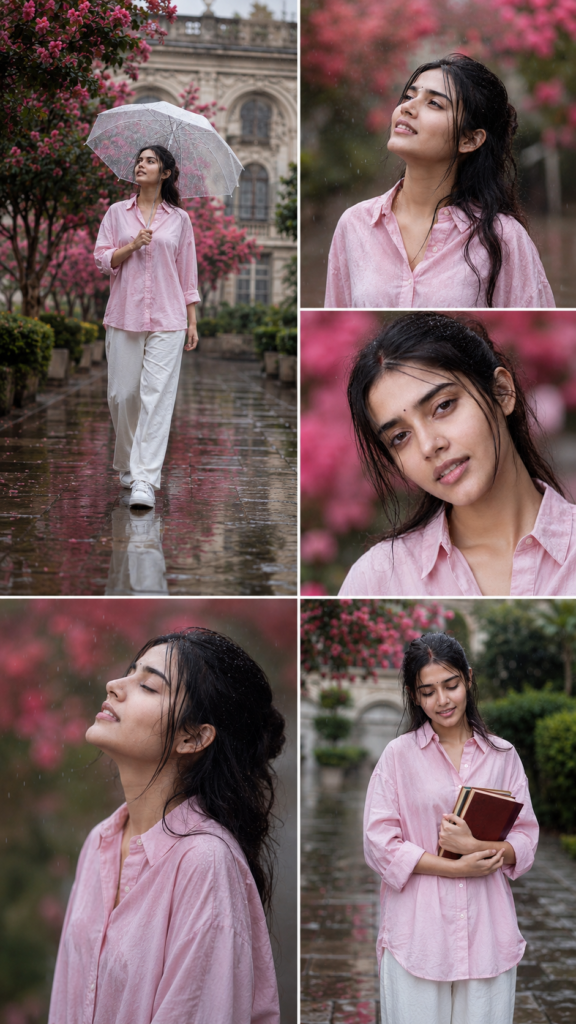
For the wardrobe, I went minimal on purpose — an oversized pastel pink button-up shirt, white wide-leg trousers, white sneakers. No layers, no accessories competing for attention. Partly that’s a styling choice: a busy outfit pulls focus away from the rain and the blossoms, which were supposed to be carrying the photo. But it also makes the technical side easier. Simpler clothing means fewer details that can shift between generations — fewer buttons to miscount, fewer folds to get confused about.
The soft pink shirt also happened to pick up the same tone as the blossom trees behind her, which is a small thing, but it’s the kind of detail that makes a photo feel intentional instead of accidental.
Building a Place That Feels Real
The setting did a lot of the heavy lifting too. I pictured a botanical garden built around old European-style architecture — pale stone buildings with arched windows, the kind you’d see lining a quiet city square rather than tucked away on a private estate. Wet stone pathways ran underneath it all, picking up soft reflections of light and scattered with fallen pink petals. A light mist sat in the background, just enough to soften the edges of the buildings without erasing them.
None of these pieces needed to be dramatic on their own. It was the combination — wet stone, soft mist, blossoms overhead, quiet architecture in the distance — that gave the whole series a consistent, calm mood, instead of five photos that just happened to share the same outfit.
The Technical Details That Actually Mattered
One thing I didn’t expect to matter as much as it did: real photography language. Talking about the kind of lens, the aperture, the depth of field — these aren’t just technical details for photographers to nod along to. They do real visual work.
A wide aperture blurs the background into that soft, creamy bokeh you see in genuine portrait photography, instead of rendering everything in flat, even focus — which is one of the fastest ways an image gives itself away as artificial. The right focal length changes how compressed or stretched the background looks behind the subject. Once I started thinking about the shot the way an actual photographer would — what lens, what aperture, what kind of light — the images stopped looking like renders and started looking like photographs someone had actually taken.
Getting Five Shots Out of One Setup
A single image rarely tells the whole story, so I built five different shots out of the same base setup — same face, same outfit, same garden, just different moments inside it.
The first is a full-body shot of her walking down the path holding a clear umbrella, calm and unhurried. The second has her looking straight up into the rain, eyes soft, clearly enjoying it rather than enduring it. The third pulls in close for a beauty-style portrait, with the blossoms melted into soft pink bokeh behind her. The fourth is quieter — a side profile, eyes closed, head tilted back, just sitting in the moment. And the last one brings in a small prop, a stack of books held against her chest, which gave the series a little more personality instead of five pure poses strung together.
What made this work wasn’t generating five separate images and hoping they happened to match. It was locking everything else in place — her face, her outfit, the location, the lighting — and changing only one thing at a time: the pose, the angle, the expression. That’s really the whole trick behind making an AI-generated shoot feel like one continuous shoot instead of five disconnected attempts that got lucky.
A Few Things I’d Tell Anyone Trying This
Start with a genuinely clear reference photo — front-facing, decent lighting, no sunglasses or heavy filters. The AI can only hold on to detail it can actually see clearly in the first place.
Resist the urge to over-describe everything at once. Piling on every adjective you can think of usually makes an image stiffer and more posed, not more realistic. A handful of specific, well-chosen details does more work than twenty vague ones thrown in together.
And don’t expect the first attempt to be the one that works. Most of what made this series feel cohesive came from small adjustments after seeing what went wrong the first time around, not from some perfect description typed once and never touched again.
What I Actually Took Away From This
The thing that stuck with me most after finishing this project is that the AI didn’t really do the creative work — it executed it. Every choice that made the photos feel real came from decisions made before a single image was generated: the mood, the wardrobe, the location, the lighting, even the order the five shots were meant to tell a story in. The tool just rendered what had already been decided.
That’s probably the biggest shift in how I think about AI image generation now. It doesn’t replace the instincts of a photographer or an art director — it rewards them. The better the decisions going in, the less the output looks like it came from a machine at all.